Your Outcome: A production-ready dual-node DGX Spark cluster serving LLMs with tensor parallelism across two GB10 boxes, fronted by LiteLLM, monitored by Prometheus/Grafana, and deployed entirely via Ansible — powered by 200Gbps RoCE interconnect.
The €5,000 Doorstop Problem
Two DGX Sparks, roughly €5,000 each. €10,000 of AI hardware on your desk.
And right now they're either running single-node inference (wasting one machine) or sitting idle while you figure out RoCE fabric configuration from NVIDIA docs that stop at single-node.
The official DGX Spark documentation covers single-node usage. Community posts have half-answers about multi-node. Stack Overflow threads about NCCL on RoCE go unanswered. Nobody has published a complete, tested deployment that goes from stock GB10s to tensor-parallel inference across two nodes.
Until now.
The Problem
You have one or two DGX Spark (GB10) systems on your desk and you know they're capable of more than what a single node delivers. But stitching two of them into a coherent inference cluster means navigating NVIDIA's networking stack, tuning NCCL for NVLink-over-RoCE, wrangling Ansible roles for vLLM and LiteLLM, and building monitoring from scratch — weeks of trial-and-error that nobody documents end-to-end.
The official DGX Spark documentation covers single-node usage. The community forums have half-answers about RoCE. Nowhere will you find a complete, tested blueprint that goes from stock GB10s to a production inference cluster with tensor parallelism, a unified API proxy, and full observability.
Two Products, One Hardware Class
We ship the DGX Spark line in two tiers so you only buy the complexity you need:
| | Blueprint (this product) | Single DGX Spark Recipe | |---|---|---| | Model | DeepSeek-V4-Flash (671B MoE) | Qwen3.8-27B | | Nodes | 2 × DGX Spark (TP2) | 1 × DGX Spark | | Interconnect | 200 Gbps RoCE | none (single GPU) | | Speculative decoding | DSpark MTP-5 + 21 correctness patches | Standard vLLM path | | Scope | Full Ansible automation + monitoring + RoCE fabric | Minimal single-node deployment | | Price | €149 | €79 |
The Blueprint is the complete, automation-first deployment for the frontier 671B model across two nodes — including the RoCE fabric, observability stack, and every NCCL/RoCE tuning that makes cross-node TP2 reliable. If you only have one Spark, or want a lighter model, the Qwen3.8-27B recipe delivers frontier-quality reasoning on a single desktop with a fraction of the operational surface.
What This Guide Does For You
This blueprint delivers the complete Ansible-based deployment that took months to develop and battle-test. Clone the repo, edit your inventory, and run one playbook. Two hours later you have a dual-node vLLM cluster with TP2, LiteLLM routing, 200Gbps RoCE fabric, Prometheus metrics, and Grafana dashboards — all configured and talking to each other.
No guesswork. No forum-scavenging. No figuring out which NCCL environment variables actually matter for GB10.
System Architecture
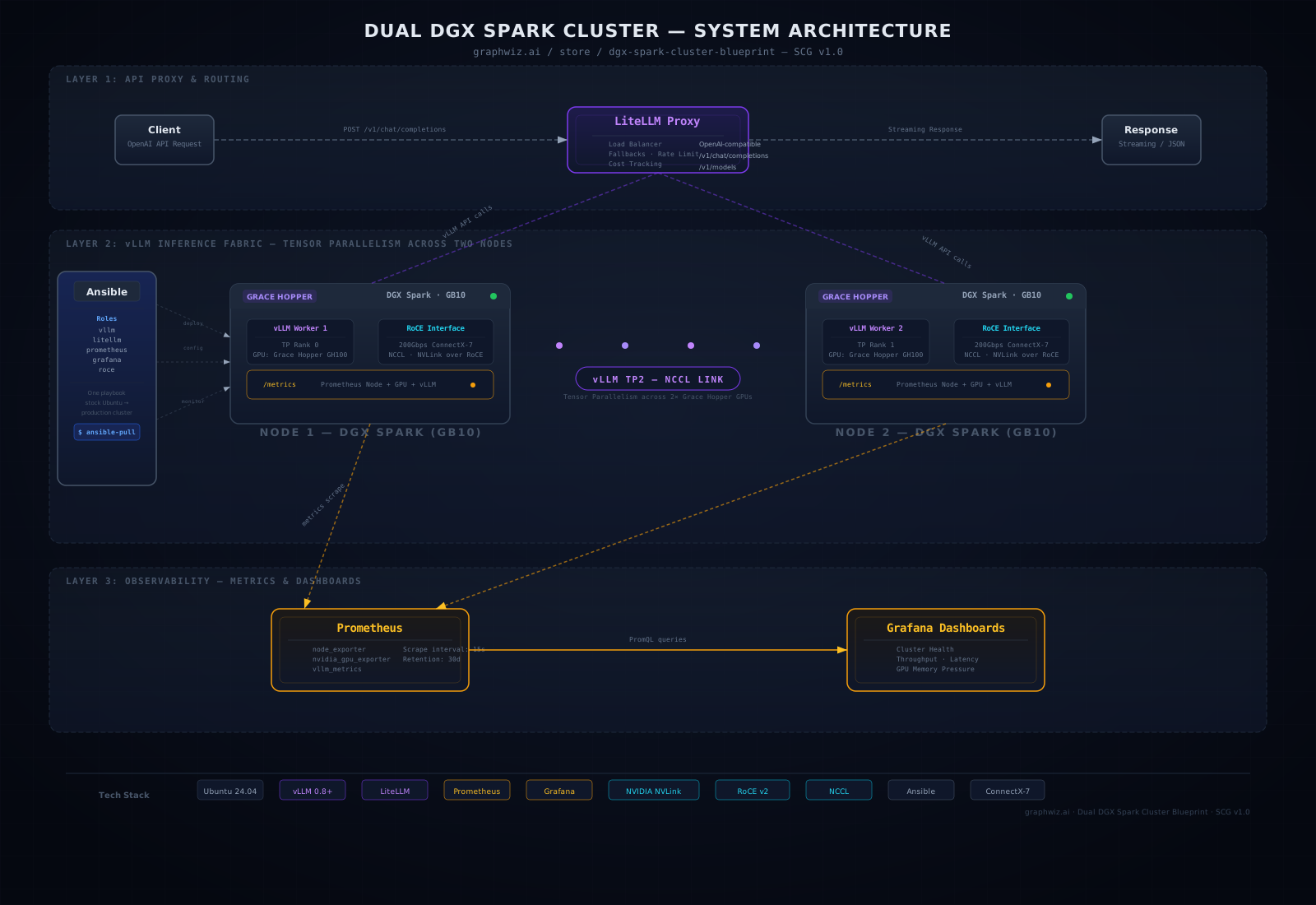
The diagram above shows the complete system architecture:
- Layer 1 — LiteLLM Proxy: Unified OpenAI-compatible API endpoint with load balancing, fallbacks, rate limiting, and cost tracking
- Layer 2 — vLLM Inference Fabric: Tensor parallelism (TP2) across two DGX Spark nodes via NCCL over 200Gbps RoCE
- Layer 3 — Observability: Prometheus scraping node, GPU, and vLLM metrics from both nodes, visualized in Grafana dashboards
- Sidebar — Ansible Management: Complete automation of all layers from stock Ubuntu to production cluster
What You'll Be Able To Do
- Deploy a dual DGX Spark cluster from scratch — stock Ubuntu, one Ansible run, zero manual SSH gymnastics
- Serve models with tensor parallelism across two nodes — vLLM configured for TP2 over 200Gbps RoCE, splitting larger models across both GB10s
- Route inference through LiteLLM — unified OpenAI-compatible endpoint with load balancing, fallbacks, rate limiting, and cost tracking
- Build a 200Gbps RoCE fabric — NCCL environment tuning, fabric manager config, PFC/ECN setup, and bandwidth validation
- Monitor everything that matters — Prometheus node + GPU + vLLM metrics, Grafana dashboards for cluster health, throughput, latency, and memory pressure
- Scale the pattern — the same Ansible roles adapt to 4, 8, or more nodes with minimal changes
- Validate the cluster — included smoke tests confirm NCCL communication, RoCE bandwidth, and end-to-end inference before you declare victory
Who Will Benefit Most
Infrastructure engineers, ML platform teams, and AI researchers who own DGX Spark hardware and need to extract maximum inference performance from their investment. You know your way around Linux and YAML — this blueprint gives you the NVIDIA-specific depth without the painful experimentation.
After You Deploy This
Someone on your team asks "what's the throughput on the Spark cluster?"
Old answer: shrug, check Grafana yourself.
New answer: pull up a Grafana dashboard showing token throughput by model, latency percentiles, and GPU utilization across both nodes. You built the monitoring — you know the answer.
That's the difference between "it works" and "it's production."
What Success Looks Like
Your two GB10s are no longer standalone boxes. They're a unified inference cluster serving production-grade LLMs through a single API endpoint, monitored and measured, deployable in under two hours, and backed by an Ansible codebase you can version-control, audit, and extend.
When someone asks "what's the throughput on the Spark cluster?" you pull up a Grafana dashboard instead of guessing.
Format & Delivery
ZIP archive containing all guides in PDF, ePub, and Mobi formats (read on any device). Immediate digital download. Lifetime updates included — every new version is yours at no extra cost.
One Purchase, Lifetime Access
No subscriptions. No recurring fees. Buy once, deploy everywhere. Every future update to this stack is included at no additional cost.
Preview Before You Buy
Download the table of contents and first chapter for free → This 5-page preview shows the architecture, version pin table, and first production decision. If you like what you see, buy the full stack.

