
The Real Cost of "Free Stacks"
Each tool has an official docker-compose. Dify has one. n8n has one. Ollama has one. Install them all separately and you get:
- 5 separate Docker Compose files — each with its own networking, its own database, its own port mapping
- No shared authentication — Dify has its own, n8n has its own, Open WebUI has its own
- No shared TLS — or 5 separate Let's Encrypt certs to manage
- No shared monitoring — if n8n's workflow queue backs up, nobody knows until jobs fail
- No shared backup — each database backed up independently (if backed up at all)
- No resource budgets — Ollama grabs all GPU memory, Dify's Celery workers crash
This is what "free" looks like after 3 months of running: a fragile patchwork that nobody fully understands.
AI Infrastructure Mastery is the alternative: one compose file, one proxy, one monitoring dashboard, one backup target, resource budgets enforced from day one.
The Missing Manual for Your AI Homelab
Setting up Dify? You can do that in 10 minutes. Installing Ollama? curl -fsSL https://ollama.com/install.sh | sh. Spinning up n8n? A three-line Docker Compose file.
Each individual tool is well-documented. The hard part — the really hard part — is making them all talk to each other in a way that doesn't collapse the first time you look away.
A production-grade homelab isn't just a bunch of containers running on the same host. It's a system where:
- Backup actually works (and you've tested the restore)
- Monitoring tells you something's wrong before your users do
- Secrets aren't hardcoded into Compose files
- Updates don't require reading three separate changelogs and hoping
- Security means TLS is automatic, not an afterthought
This guide is the missing manual — the integration layer that connects the individual stacks into a cohesive, production-ready AI infrastructure platform.
What's Inside
A complete architecture that ties together seven core components into a unified system behind a single Traefik reverse proxy with automatic SSL:
- Dify — LLM application orchestration with visual workflow builder, RAG pipelines, and agent capabilities
- n8n — Workflow automation connecting AI outputs to 400+ integrations (email, Slack, CRM, databases)
- Ollama — Local LLM inference for privacy-sensitive workloads, with GPU acceleration
- Qdrant — High-performance vector database for semantic search and RAG embeddings
- Prometheus + Grafana — Real-time infrastructure monitoring with pre-built dashboards
- MinIO — S3-compatible object storage for backups and artifact storage
Architecture Overview
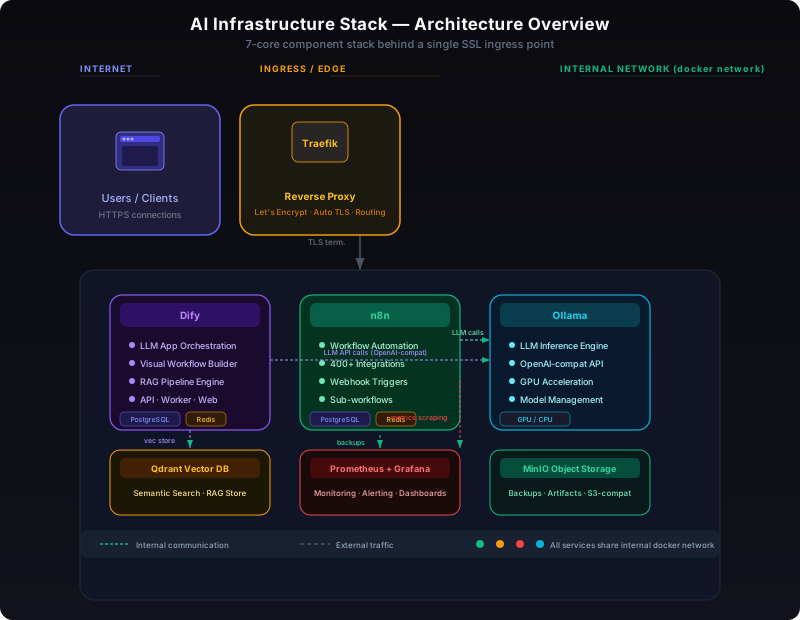
The stack runs behind a single Traefik reverse proxy that terminates TLS and routes traffic by hostname. An internal Docker network keeps service-to-service communication isolated from the outside world. The diagram above shows how every component connects:
- Traefik terminates SSL via Let's Encrypt and routes
dify.yourdomain.com,n8n.yourdomain.com, etc. to the correct containers - Dify (api + worker + web) stores application data in PostgreSQL, uses Redis for the task queue, and connects to Qdrant for vector storage
- n8n has dedicated PostgreSQL and Redis instances; it calls Ollama's OpenAI-compatible API for LLM-powered workflow steps
- Ollama serves models on the internal network — used by both Dify and n8n
- Prometheus scrapes metrics from every service; Grafana visualizes them
- MinIO stores nightly backups of all databases and volumes
You'll learn:
- How to wire Dify's vector store to Qdrant for production-scale RAG pipelines
- How to connect n8n to Ollama's local models for workflow automation without API costs
- How to configure MinIO as a backup target for every service in the stack
- How Traefik auto-provisions Let's Encrypt certificates for all services with zero config
- How Prometheus discovers all services and Grafana visualizes the health of the entire stack
- How to restore individual services from MinIO backups without taking down the whole system
- How to pin versions and apply updates with zero-downtime rollouts
- How to set up resource limits so Ollama doesn't starve Dify of memory
- How to configure n8n webhooks to trigger Dify workflows programmatically
- How to secure inter-service communication with internal networks
Version Pin Policy
Each component in the stack is pinned to a specific version in docker-compose.yml, not :latest. This guarantees reproducibility — the stack you deploy today will work identically months from now.
| Component | Version (v1.2.0) | Upgrade Path |
|-----------|------------------|-------------|
| Traefik | v3.1 | Minor: env bump, Major: check routing rules |
| Dify | 1.1.3 | Minor: safe, Major: migrate DB schema first |
| n8n | 1.80.0 | Minor: safe, Major: check webhook format |
| Ollama | 0.5.4 | Minor: safe, Major: check model compatibility |
| Qdrant | 1.13.0 | Minor: safe, Major: re-index vectors |
| Prometheus | v2.54 | Minor: safe, Major: check recording rules |
| Grafana | 11.4 | Minor: safe, Major: check plugin compat |
| MinIO | RELEASE.2024-12-18 | Minor: safe, Major: check bucket config |
Versions are reviewed and bumped quarterly. Active purchasers receive notifications when a new version of the stack is published.
Who This Is For
- DevOps engineers who've already deployed individual AI stacks (Dify, n8n, Ollama) and now need to integrate them into a cohesive platform with proper monitoring, backup, and security
- Homelab enthusiasts ready to move from "it works on my machine" to "it survives a power outage and an SSD failure"
- Self-hosters running AI services who've learned the hard way that "I'll set up backups later" means "I've already lost data"
- Technical founders building AI-powered products who want a production-grade foundation before the first customer hits the login page
If you can edit a YAML file and run docker compose up, you have everything you need to deploy this stack.
Changelog
v1.2.0 (2026-06-19)
- Added Qdrant as the vector database backend (replaces Weaviate)
- Updated Dify to v1.1.3 with new RAG pipeline features
- Added Prometheus scrape config for Qdrant and Ollama metrics
- Improved backup scripts — MinIO backup now compresses before upload
- Added resource limit defaults to prevent Ollama memory starvation
v1.1.0 (2025-12-10)
- Added Traefik as the reverse proxy (replaces Nginx)
- Added MinIO backup target for all services
- Updated n8n to v1.73.0 with sub-workflow support
- Added Grafana dashboard — pre-configured for all stack services
- Pinned all versions — no more
:latest
v1.0.0 (2025-09-01)
- Initial release: Dify + n8n + Ollama + Prometheus/Grafana behind Nginx
- Complete docker-compose.yml with 15 services
- Production runbook and quick-start guide
Format & Delivery
You receive a ZIP archive containing:
- docker-compose.yml — The complete 20+ service stack, fully commented
- .env.example — Every environment variable documented with sensible defaults
- README.md — Architecture overview, quick-start guide, and production runbook
All future updates to the stack are included at no additional cost. When a new version of Dify, n8n, or any component is released, the updated compose file is published as a new download.
No subscriptions. No recurring fees. One purchase, lifetime access, unlimited deployments.
The Stack That Documents Itself
You're deploying version-pinned services with changelog entries. Every service, every environment variable, every architecture decision is documented in the README. Six months from now, a new engineer joins the team and can understand the entire stack from the compose file — no tribal knowledge required.
That's the difference between "it works on my machine" and "anyone can maintain it."