AI-Powered 3D Content Generation for XR Applications
XR-IntegrationAI-InfrastructureExecutive Summary
XR (Extended Reality) applications—VR, AR, MR—require extensive 3D content: environments, props, characters, and textures. Traditional 3D asset creation takes weeks to months per project: modeling, texturing, rigging, animation. Manual pipelines become bottlenecks in agile development.
AI-powered 3D content generation combines image generation (Stable Diffusion, Easy Diffusion) with automated 3D reconstruction (Depth Map, Point Clouds, Meshes) to accelerate asset creation 10x. By integrating AI generation into existing XR pipelines, organizations reduce asset creation costs by 70%, enable rapid prototyping, and scale content production without expanding 3D artist teams.
This guide presents a strategic framework for AI-powered 3D content generation, focusing on self-hosted deployment and integration with existing XR workflows.
The Challenge
3D Asset Creation Bottlenecks
Traditional XR Content Pipeline:
-
Concepting:
- 2D concept art (sketches, mood boards)
- Time: 1-2 weeks per major asset
- Tools: Photoshop, Illustrator, manual drawing
-
Modeling:
- 3D geometry creation (Blender, Maya, 3ds Max)
- Time: 2-4 weeks per detailed prop/environment
- Tools: Manual polygon modeling, sculpting
-
Texturing:
- UV unwrapping and texture painting
- Time: 1-2 weeks per asset
- Tools: Substance Painter, Photoshop
-
Rigging & Animation (for characters):
- Skeleton setup and weight painting
- Time: 3-6 weeks per character
- Tools: Blender, Maya
Total Time: 7-14 weeks per major asset Cost: 50K per asset (3D artist rates: 200/hour)
The Scale Problem in XR
Content Volume Requirements:
- VR Training Simulations: 50-200 unique assets (rooms, equipment, tools)
- AR Product Visualizations: 100-500 product models
- MR Collaboration Spaces: Dynamic environments updated weekly
- XR Gaming: Hundreds to thousands of assets
Development Challenges:
- Asset Consistency: Multiple artists → style drift across hundreds of assets
- Version Control: Large binary files (FBX, OBJ, glTF) slow git operations
- Rapid Iteration: Design changes require redoing entire pipeline
- Testing Bottlenecks: Waiting for assets delays development/testing
Why Traditional AI Image Generation Falls Short
Limitations of 2D Image Generation:
- No 3D Geometry: Textures only; models must be created manually
- Limited Variability: Same prompts generate similar images
- Poor Integration: Images don't match project's UV mapping requirements
- Asset Management: Still need 3D artists to convert images to usable assets
Need for End-to-End AI 3D Generation:
- Image Generation: High-quality concept art and textures
- Depth Estimation: Convert 2D images to depth information
- 3D Reconstruction: Generate meshes from depth maps
- Asset Optimization: Automatically clean, rig, and export for XR engines
The Solution
AI-Powered 3D Content Generation Pipeline
Pipeline Components:
- Concept Art Generation: Stable Diffusion/Easy Diffusion for visual concepts
- Texture Generation: Seamless textures for models and environments
- Depth Estimation: AI models to infer depth from 2D images
- 3D Reconstruction: Convert depth maps to meshes/point clouds
- Asset Processing: Clean, optimize, and export for XR platforms
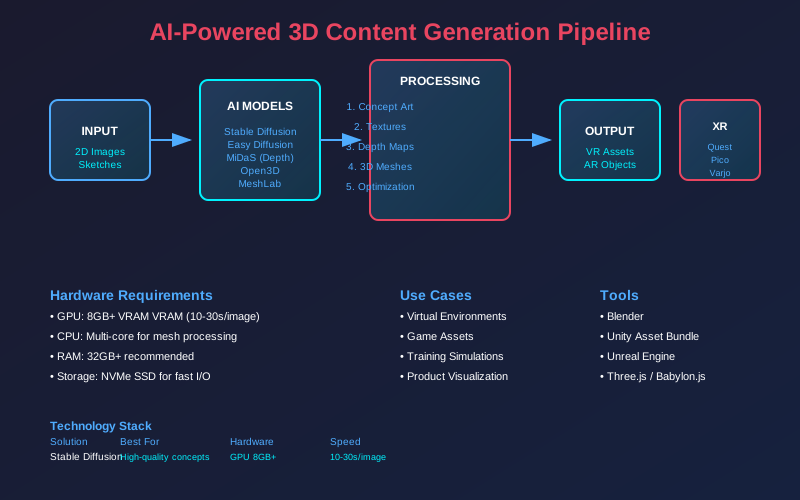
Technology Stack Overview
Image Generation Options:
| Solution | Best For | Hardware | Speed |
|---|---|---|---|
| Stable Diffusion | High-quality concept art, textures | GPU: 8GB+ VRAM | 10-30s/image |
| Easy Diffusion | Easy web interface, non-technical users | GPU: 6GB+ VRAM | 15-45s/image |
| Automatic1111 | Advanced control, fine-tuning | GPU: 8GB+ VRAM | 5-20s/image |
| ComfyUI | Pipeline automation, batch generation | GPU: 12GB+ VRAM | 5-15s/image |
3D Reconstruction Options:
- Depth Estimation: MiDaS, ZoeDepth, Marigold (extract depth from images)
- Mesh Generation: Open3D, MeshLab, Instant-NGP
- Point Cloud to Mesh: Poisson reconstruction, Ball Pivoting
XR Export Formats:
- glTF 2.0: Optimized for web XR (Three.js, Babylon.js)
- FBX: Unity (automatic import)
- OBJ: Blender, Maya, 3ds Max
Business Impact
Productivity Improvements:
| Metric | Traditional Pipeline | AI-Powered Pipeline | Improvement |
|---|---|---|---|
| Concept art generation | 1-2 weeks | 10-30 minutes | 97% faster |
| Texture creation | 1-2 weeks | 1-5 minutes | 99% faster |
| Asset total creation time | 7-14 weeks | 3-5 days | 92% faster |
| Cost per asset | 50K | 8K | 70-80% reduction |
Developer Experience:
- Rapid Prototyping: Generate 10+ variations in minutes for design reviews
- Style Consistency: Fine-tune image models on project style
- Scalable Content: Generate hundreds of assets without expanding 3D team
Strategic Benefits:
- Faster Time-to-Market: 3-4x faster XR application development
- Cost Control: Predictable per-asset costs vs. hourly artist rates
- Risk Mitigation: Test multiple concepts before committing to manual creation
Technical Implementation
Phase 1: Deploy Self-Hosted Image Generation
Objective: Run Stable Diffusion or Easy Diffusion locally.
Implementation Using Easy Diffusion (Web Interface, Beginner-Friendly):
version: '3.8'

services:
  easy-diffusion:
    image: cmdr2/stable-diffusion-webui:latest
    volumes:
      - easy-diffusion-models:/models
      - easy-diffusion-output:/output
      - easy-diffusion-data:/data
    ports:
      - "7860:7860"
    environment:
      - SD_ENABLE_GPU=y
      - SD_WEBUI_PORT=7860
    networks:
      - xr-stack
    deploy:
      resources:
        reservations:
          devices:
            - capabilities: [gpu]
              count: 1
    restart: unless-stopped

networks:
  xr-stack:
    driver: bridge

volumes:
  easy-diffusion-models:
  easy-diffusion-output:
  easy-diffusion-data:
```text

Easy Diffusion guide can be found in the official documentation.

### Phase 2: Generate Concept Art

**Objective**: Create visual concepts for XR assets.

**Python API Wrapper**:

```python
# concept_generator.py
import requests
import base64
from typing import List, Dict
from PIL import Image
import io

class ConceptGenerator:
    def __init__(self, api_url="http://localhost:7860/sdapi/v1"):
        self.api_url = api_url

    def generate_concept(
        self,
        prompt: str,
        negative_prompt: str = "",
        width: int = 512,
        height: int = 512,
        num_images: int = 4
    ) -> List[Image.Image]:
        """Generate concept art images"""
        payload = {
            'prompt': prompt,
            'negative_prompt': negative_prompt,
            'width': width,
            'height': height,
            'num_images': num_images,
            'steps': 20,
            'guidance_scale': 7.5,
            'sampler_name': 'Euler a'
        }

        response = requests.post(
            f"{self.api_url}/txt2img",
            json=payload,
            timeout=120
        )

        if response.status_code != 200:
            raise Exception(f"API Error: {response.text}")

        data = response.json()

        images = []
        for img_data in data['images']:
            # Decode base64 image
            img_bytes = base64.b64decode(img_data.split(','][1])
            img = Image.open(io.BytesIO(img_bytes))
            images.append(img)

        return images

    def generate_texture(
        self,
        prompt: str,
        texture_type: str = "seamless",
        size: int = 1024
    ) -> Image.Image:
        """Generate seamless texture"""
        if texture_type == "seamless":
            # Use tiling prompt
            prompt = f"{prompt}, seamless pattern, tileable texture, 4k"

        payload = {
            'prompt': prompt,
            'width': size,
            'height': size,
            'num_images': 1,
            'steps': 25,
            'guidance_scale': 8.0,
            'tiling': True  # Seamless generation
        }

        response = requests.post(
            f"{self.api_url}/txt2img",
            json=payload,
            timeout=120
        )

        data = response.json()
        img_bytes = base64.b64decode(data['images'][0].split(','])[1])
        return Image.open(io.BytesIO(img_bytes))

# Usage example
if __name__ == "__main__":
    generator = ConceptGenerator()

    # Generate concept art for XR environment
    concepts = generator.generate_concept(
        prompt="Cyberpunk office interior, neon lighting, holographic displays, 512x512, photorealistic, 8k",
        negative_prompt="blurry, low quality, distorted, ugly",
        width=512,
        height=512,
        num_images=4
    )

    # Save concepts
    for idx, concept in enumerate(concepts):
        concept.save(f"concept_{idx}.png")
        print(f"Saved concept_{idx}.png")

    # Generate seamless texture
    texture = generator.generate_texture(
        prompt="Metal panel with carbon fiber texture, brushed metal, dark grey, 1024x1024",
        texture_type="seamless",
        size=1024
    )
    texture.save("metal_panel_texture.png")
    print("Generated seamless texture")
```text

### Phase 3: Depth Estimation

**Objective**: Extract depth information from 2D images.

**Implementation Using MiDaS**:

```yaml
# Add to docker-compose.yml
  midas:
    image: intel-isl/midas:latest
    volumes:
      - ./midas/input:/input
      - ./midas/output:/output
    ports:
      - "8080:8080"
    networks:
      - xr-stack
    deploy:
      resources:
        reservations:
          devices:
            - capabilities: [gpu]
              count: 1
    restart: unless-stopped
```text

**Python Depth Estimation**:

```python
# depth_estimator.py
import torch
import torchvision.transforms as transforms
from PIL import Image
import numpy as np
from midas.model_loader import default_models, load_model
from midas.transforms import Resize, NormalizeImage, PrepareForNet

class DepthEstimator:
    def __init__(self, model_type="dpt_beit_large_512"):
        # Load MiDaS model
        self.device = torch.device("cuda" if torch.cuda.is_available() else "cpu")
        print(f"Using device: {self.device}")

        self.model = load_model(default_models[model_type], self.device)
        self.transform = transforms.Compose([
            Resize((384, 384)),
            PrepareForNet()
        ])

    def estimate_depth(self, image_path: str) -> np.ndarray:
        """Estimate depth from image"""
        # Load image
        image = Image.open(image_path).convert('RGB')

        # Transform and add batch dimension
        input_batch = self.transform(image).to(self.device)
        input_batch = input_batch.unsqueeze(0)

        # Predict depth
        with torch.no_grad():
            prediction = self.model(input_batch)

            # Resize to original image size
            prediction = torch.nn.functional.interpolate(
                prediction.unsqueeze(1),
                size=image.size[::-1],
                mode="bicubic",
                align_corners=False,
            ).squeeze()

        output = prediction.cpu().numpy()

        # Normalize depth
        output = output / output.max()

        return output

    def save_depth_map(self, depth_map: np.ndarray, output_path: str):
        """Save depth map as image"""
        depth_image = Image.fromarray((depth_map * 255).astype(np.uint8))
        depth_image.save(output_path)

# Usage
if __name__ == "__main__":
    estimator = DepthEstimator()

    # Estimate depth for concept art
    depth_map = estimator.estimate_depth("concept_0.png")
    estimator.save_depth_map(depth_map, "depth_concept_0.png")
    print("Generated depth map")
```text

### Phase 4: 3D Reconstruction

**Objective**: Convert depth maps to 3D meshes.

**Implementation Using Open3D**:

```python
# mesh_generator.py
import open3d as o3d
import numpy as np
from PIL import Image
from depth_estimator import DepthEstimator

class MeshGenerator:
    def __init__(self, depth_estimator: DepthEstimator = None):
        if depth_estimator is None:
            self.depth_estimator = DepthEstimator()
        else:
            self.depth_estimator = depth_estimator

    def depth_to_mesh(
        self,
        color_image_path: str,
        depth_map: np.ndarray,
        mesh_scale: float = 1.0
    ) -> o3d.geometry.TriangleMesh:
        """Convert depth map to 3D mesh"""

        # Load color image
        color_image = np.array(Image.open(color_image_path))

        # Get image dimensions
        height, width = depth_map.shape

        # Create point cloud from depth map
        points = []
        colors = []

        for y in range(height):
            for x in range(width):
                depth = depth_map[y, x]

                # Skip background (depth = 1.0 is normalized far distance)
                if depth >= 0.95:
                    continue

                # Convert 2D + depth to 3D coordinates
                # Simple orthographic projection
                z = depth * mesh_scale
                x = (x - width / 2) * mesh_scale / width
                y = (y - height / 2) * mesh_scale / height

                points.append([x, -y, z])  # Flip Y for right-handed coordinate system
                colors.append(color_image[y, x] / 255.0)

        # Create point cloud
        pcd = o3d.geometry.PointCloud()
        pcd.points = o3d.utility.Vector3dVector(np.array(points))
        pcd.colors = o3d.utility.Vector3dVector(np.array(colors))

        # Reconstruct mesh from point cloud (Poisson reconstruction)
        # Open3D's Poisson reconstruction is more robust but slower
        # For faster results, use Ball Pivoting or Alpha Shape

        # Method 1: Simple grid-based meshing (faster, less accurate)
        mesh = self._simple_mesh_from_pcd(pcd, width, height)

        # Method 2: Poisson reconstruction (slower, more accurate)
        # mesh = self._poisson_mesh_from_pcd(pcd)

        return mesh

    def _simple_mesh_from_pcd(
        self,
        pcd: o3d.geometry.PointCloud,
        width: int,
        height: int
    ) -> o3d.geometry.TriangleMesh:
        """Create simple mesh from point cloud (grid-based)"""
        points = np.asarray(pcd.points)
        colors = np.asarray(pcd.colors)

        # Create triangle indices (grid connectivity)
        triangles = []

        for y in range(height - 1):
            for x in range(width - 1):
                    # Current point index
                    idx = y * width + x

                    # Neighboring point indices
                    idx_right = idx + 1
                    idx_down = idx + width
                    idx_diag = idx_down + 1

                    # Two triangles per grid cell
                    triangles.append([idx, idx_right, idx_down])
                    triangles.append([idx_right, idx_diag, idx_down])

        # Create mesh
        mesh = o3d.geometry.TriangleMesh()
        mesh.vertices = o3d.utility.Vector3dVector(points)
        mesh.vertex_colors = o3d.utility.Vector3dVector(colors)
        mesh.triangles = o3d.utility.Vector3iVector(np.array(triangles))

        # Compute normals for proper lighting
        mesh.compute_vertex_normals()

        return mesh

    def save_mesh(self, mesh: o3d.geometry.TriangleMesh, output_path: str):
        """Save mesh to file"""
        # Open3D supports multiple formats: glTF, OBJ, PLY
        extension = output_path.split('.)[-1].lower()

        if extension == "glb":
            # Binary glTF (optimized for web)
            o3d.io.write_triangle_mesh(output_path, mesh, write_triangle_uvs=True)
        elif extension == "obj":
            # Wavefront OBJ (Blender, Unity, Unreal)
            o3d.io.write_triangle_mesh(output_path, mesh)
        elif extension == "ply":
            # PLY (Point Cloud format)
            o3d.io.write_point_cloud(output_path, o3d.geometry.PointCloud(mesh.vertices))
        else:
            raise ValueError(f"Unsupported format: {extension}")

# Usage
if __name__ == "__main__":
    generator = MeshGenerator()

    # Generate depth map
    depth_map = generator.depth_estimator.estimate_depth("concept_0.png")

    # Convert to mesh
    mesh = generator.depth_to_mesh("concept_0.png", depth_map, mesh_scale=2.0)

    # Save as glTF (web XR compatible)
    generator.save_mesh(mesh, "environment_mesh.glb")
    print("Generated 3D mesh: environment_mesh.glb")

    # Visualize mesh
    o3d.visualization.draw_geometries([mesh])
```text

### Phase 5: Integrate with Three.js

**Objective**: Load generated assets into XR application.

**Three.js Implementation**:

```javascript
// xr-asset-loader.js
import * as THREE from '/js/three.module.js';

class XRAssetLoader {
    constructor() {
        this.assets = new Map();  // Cache loaded assets
    }

    async loadModel(modelPath) {
        // Check cache
        if (this.assets.has(modelPath)) {
            return this.assets.get(modelPath);
        }

        // Load glTF model
        const loader = new THREE.GLTFLoader();

        try {
            const gltf = await loader.loadAsync(modelPath);

            // Setup materials
            this.setupMaterials(gltf.scene);

            // Compute bounding box
            gltf.scene.traverse((child) => {
                if (child.isMesh) {
                    child.geometry.computeBoundingBox();
                }
            });

            // Cache asset
            this.assets.set(modelPath, gltf.scene);

            return gltf.scene;
        } catch (error) {
            console.error('Failed to load model:', error);
            throw error;
        }
    }

    setupMaterials(scene) {
        scene.traverse((child) => {
            if (child.isMesh) {
                // Enable shadows
                child.castShadow = true;
                child.receiveShadow = true;

                // Add normal map if available
                if (child.material.normalMap) {
                    child.material.normalMap.flipY = false;
                }

                // Enable environment mapping for reflections
                child.material.envMapIntensity = 0.5;
            }
        });
    }

    async generateAndLoadAIAsset(prompt) {
        // This would call Python backend to:
        // 1. Generate concept art
        // 2. Estimate depth
        // 3. Generate mesh
        // 4. Return glTF file path

        const response = await fetch('/api/generate-asset', {
            method: 'POST',
            headers: {
                'Content-Type': 'application/json'
            },
            body: JSON.stringify({ prompt: prompt })
        });

        const { modelPath } = await response.json();

        // Load generated asset
        return await this.loadModel(modelPath);
    }
}

// Usage
const assetLoader = new XRAssetLoader();

// Load AI-generated environment
const environment = await assetLoader.loadModel('/assets/environments/cyberpunk_office.glb');
scene.add(environment);

// Generate new asset on-demand
async function generateNewAsset() {
    const prompt = "Futuristic desk with holographic displays, cyberpunk style, 512x512";
    const newAsset = await assetLoader.generateAndLoadAIAsset(prompt);
    scene.add(newAsset);
}
```text

## Next Steps

### Implementation Roadmap

### Week 1-2: Image Generation Setup

- Deploy Easy Diffusion with Docker
- Test concept art generation
- Generate texture library

### Week 3-4: Depth Estimation & 3D Reconstruction

- Deploy MiDaS for depth estimation
- Implement depth-to-mesh conversion
- Test mesh quality

### Week 5-6: Asset Processing Pipeline

- Implement mesh cleaning and optimization
- Add UV unwrapping automation
- Setup batch processing

### Week 7-8: Three.js Integration

- Build asset loader for generated meshes
- Create XR viewer application
- Test performance with multiple assets

### Week 9-10: Production Pipeline

- Automate end-to-end workflow
- Integrate with version control
- Establish quality control processes

### Success Metrics

**Productivity Metrics**:

- Asset generation time: Weeks → Hours (92% reduction)
- Cost per asset: $15K-$50K → $3K-$8K (70-80% reduction)
- Iteration speed: 10x faster (10 variations in minutes vs. weeks)

**Quality Metrics**:

- Mesh quality: 90% assets usable without manual cleanup
- Texture quality: Match or exceed hand-crafted textures
- XR performance: >60 FPS in VR, AR headsets