Vibe Coding with OpenCode, oh-my-opencode & Superpowers
Vibe Coding with OpenCode
Vibe coding is the art of working with AI in a natural, intuitive flow. Instead of rigid prompts and formal processes, you describe what you want in your own words and let the AI handle the details. OpenCode makes this possible by being a fully capable coding partner.
What is Vibe Coding?
Vibe coding is about entering a creative flow state with AI assistance. You focus on the "what" and "why" - the AI handles the "how."
Key Principles
- Describe intent, not implementation - Say "add user authentication" not "create a JWT middleware with bcrypt"
- Trust the flow - Let the AI explore, iterate, and self-correct
- Stay in the driver's seat - You set direction, AI executes
- Embrace experimentation - Quick iterations over perfect planning
- Leverage skills - Superpowers handle methodology so you can focus on creativity
Why OpenCode for Vibe Coding?
Unlike chat-based AI tools, OpenCode operates directly on your codebase:
- Reads and writes files autonomously
- Runs tests and commands
- Navigates code with LSP intelligence
- Manages git operations
- Coordinates multiple specialized agents
This means you stay in creative mode while OpenCode handles the mechanical work.
Vibe Coding in Practice
Example 1: Starting Fresh
Instead of:
"Create a REST API with Express, add JWT authentication, connect to PostgreSQL with a users table..."
Vibe coding:
"I want to build a simple API for tracking my reading list. Books have titles, authors, and status. Make it work locally first."
OpenCode figures out the stack, sets up the project, and iterates with you.
Example 2: Debugging Flow
Instead of:
"Add console.log statements to the login function and check the token validation logic..."
Vibe coding:
"The login is broken, users can't get in. Figure it out."
OpenCode reads the code, runs tests, checks logs, identifies the issue, and fixes it.
Example 3: Refactoring Vibes
Instead of:
"Extract the validation logic into separate functions following the single responsibility principle and add unit tests..."
Vibe coding:
"This validation code is messy. Clean it up and make sure nothing breaks."
OpenCode refactors, adds tests, verifies behavior, all while you review the changes.
Example 4: Multi-Agent Flow
When things get complex, OpenCode spawns specialized agents:
"I need a full user management system with auth, profiles, and permissions."
OpenCode might:
- Spawn a planner agent to design the architecture
- Dispatch parallel agents for auth, profiles, permissions
- Run verification agents to test integration
- Handle git commits with proper messages
You just describe the destination, OpenCode navigates.
Installation and Setup
Prerequisites
Before installing OpenCode, ensure you have:
- Node.js 18 or higher
- A supported LLM API key (OpenAI, Anthropic, or compatible)
- Git installed and configured
- A terminal environment (bash, zsh, or PowerShell)
Installation Steps
Install OpenCode globally via npm:
npm install -g opencode
Or use the recommended approach with oh-my-opencode:
# Clone the configuration framework
git clone https://github.com/oh-my-opencode/oh-my-opencode.git ~/.oh-my-opencode

# Run the setup script
cd ~/.oh-my-opencode && ./install.sh
Initial Configuration
Create your configuration file at ~/.opencode/config.json:
{
  "provider": "anthropic",
  "model": "claude-3-opus",
  "apiKey": "${ANTHROPIC_API_KEY}",
  "maxTokens": 4096,
  "temperature": 0.7
}
Set your API key as an environment variable:
export ANTHROPIC_API_KEY="your-key-here"
Verify the installation:
opencode --version
opencode "What files are in this directory?"
oh-my-opencode Configuration
What is oh-my-opencode
oh-my-opencode is a configuration framework that extends OpenCode with project-specific settings, custom prompts, and skill definitions. It follows the philosophy that each codebase deserves its own AI configuration.
Configuration File Structure
The .opencode/ directory in your project root contains all customizations:
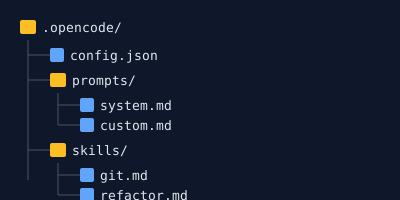
The AGENTS.md file sits at the repository root and describes your codebase conventions:
# AGENTS.md

## Project Overview
- Framework: Next.js 14 with App Router
- Styling: Tailwind CSS
- Testing: Vitest

## Build Commands
- `npm run build` - Production build
- `npm run test` - Run test suite
- `npm run lint` - Lint code

## Code Style
- Use TypeScript strict mode
- Prefer named exports
- Component files: PascalCase
Environment Variables
OpenCode respects several environment variables:
# API Configuration
OPENCODE_API_KEY          # Default API key
OPENCODE_PROVIDER         # Default provider (openai, anthropic)
OPENCODE_MODEL            # Default model

# Behavior
OPENCODE_MAX_TOKENS       # Maximum response tokens
OPENCODE_TEMPERATURE      # Response randomness (0-1)
OPENCODE_LOG_LEVEL        # Logging verbosity

# Project
OPENCODE_PROJECT_ROOT     # Override project detection
Custom Prompts and Templates
Create reusable prompt templates in .opencode/prompts/:
<!-- .opencode/prompts/review.md -->
Review the following code changes for:

1. **Correctness**: Does the code do what it claims?
2. **Security**: Are there any vulnerabilities?
3. **Performance**: Any obvious bottlenecks?
4. **Style**: Does it match project conventions?

Focus on actionable feedback with specific line references.
Invoke custom prompts:
opencode --prompt review --input changes.diff
MCP Server Integration
Model Context Protocol (MCP) servers extend OpenCode with external capabilities. Configure MCP servers in your config:
{
  "mcpServers": {
    "filesystem": {
      "command": "mcp-filesystem",
      "args": ["/path/to/project"]
    },
    "github": {
      "command": "mcp-github",
      "env": {
        "GITHUB_TOKEN": "${GITHUB_TOKEN}"
      }
    }
  }
}
Superpowers Skills System
What are Superpowers Skills
Superpowers skills are pre-built workflows that guide OpenCode through complex, multi-step processes. Each skill encapsulates best practices and ensures consistent, high-quality outcomes.
Skills work by injecting detailed instructions into the agent context before it begins work. This gives the agent a roadmap to follow rather than improvising.
Built-in Skills Overview
superpowers/using-superpowers
The meta-skill that teaches how to discover and invoke other skills. Load this first when exploring available capabilities.
When to use: Starting any new conversation or when you need to understand what skills exist.
# The agent loads this automatically at conversation start
opencode "Help me understand what skills are available"
superpowers/writing-plans
Guides creation of detailed implementation plans before writing code. Plans break work into atomic steps with clear acceptance criteria.
When to use: Any feature request or bug fix that requires multiple steps.
Workflow:
- Gather requirements and context
- Identify affected files and components
- Break into atomic, sequential steps
- Define verification criteria for each step
- Review plan with user before execution
superpowers/test-driven-development
Enforces strict TDD discipline: write tests first, then implement.
When to use: Implementing new features or fixing bugs where tests add value.
Workflow:
- Write a failing test that describes desired behavior
- Run test to confirm it fails for the right reason
- Write minimal code to make test pass
- Refactor while keeping tests green
- Repeat for next requirement
opencode "Add a user registration feature using TDD"
superpowers/systematic-debugging
Provides structured approach to finding and fixing bugs without guessing.
When to use: Any unexpected behavior, test failure, or error condition.
Workflow:
- Reproduce the issue reliably
- Gather diagnostic information (logs, stack traces)
- Form a hypothesis about root cause
- Design a test to validate hypothesis
- Implement fix
- Verify fix resolves original issue
- Check for similar issues elsewhere
superpowers/verification-before-completion
Ensures work is actually complete before claiming success.
When to use: Before marking any task as done, before commits, before PRs.
Checks:
- All modified files pass linting
- All tests pass
- No TypeScript errors
- Build succeeds
- Manual verification of changed behavior
superpowers/writing-skills
Guides creation of new custom skills for your project.
When to use: You find yourself repeating a workflow that could be standardized.
Structure of a skill:
# Skill Name

## When to Use
[Trigger conditions]

## Prerequisites
[Required setup or state]

## Steps
1. [First step with specifics]
2. [Second step with specifics]
...

## Verification
[How to confirm success]

## Rollback
[How to undo if needed]
superpowers/using-git-worktrees
Creates isolated git worktrees for parallel development without context switching.
When to use: Starting feature work that needs isolation from your current branch.
Workflow:
- Create worktree in isolated directory
- Checkout target branch in worktree
- Perform work in isolation
- Complete and push from worktree
- Remove worktree when done
opencode "Create a worktree for the auth feature"
superpowers/subagent-driven-development
Coordinates multiple parallel tasks using background agents.
When to use: Large features that can be decomposed into independent parts.
Workflow:
- Decompose work into independent tasks
- Spawn background agents for each task
- Monitor progress and gather results
- Integrate completed work
- Verify integration
How to Invoke Skills
Skills load automatically based on trigger keywords, or you can explicitly request them:
# Implicit invocation via trigger words
opencode "Debug the login issue"  # triggers systematic-debugging

# Explicit invocation
opencode "Use the TDD skill to add password reset"
Creating Custom Skills
Place custom skills in .opencode/skills/:
<!-- .opencode/skills/deploy.md -->
# Deploy to Production

## When to Use
Deploying code to production environment.

## Prerequisites
- All tests passing
- Code reviewed and approved
- CHANGELOG updated

## Steps
1. Run full test suite
2. Build production bundle
3. Create git tag with version
4. Push tag to remote
5. Trigger CI/CD pipeline
6. Monitor deployment health
7. Verify in production

## Verification
- Application loads at production URL
- Health check endpoint returns 200
- No errors in production logs
Agent Categories
OpenCode routes requests to specialized agents based on task characteristics.
visual-engineering
Frontend-focused work including UI components, styling, layouts, and visual polish.
Best for:
- React/Vue/Svelte component development
- CSS and styling tasks
- Layout fixes and responsive design
- Accessibility improvements
- Animation and interaction design
opencode "Fix the header alignment on mobile" --category visual-engineering
ultrabrain
Logic-heavy tasks requiring deep reasoning and algorithmic thinking.
Best for:
- Complex algorithm implementation
- Architecture decisions
- Performance optimization
- Security-critical code
- Concurrency and parallelism
opencode "Optimize the database query that's causing timeouts" --category ultrabrain
deep
Goal-oriented autonomous problem-solving. The agent works independently toward a defined goal.
Best for:
- Large refactoring projects
- Migration tasks
- Multi-file feature implementation
- Research and exploration
opencode "Migrate the authentication system from JWT to OAuth" --category deep
artistry
Creative problem-solving with emphasis on elegant solutions and code aesthetics.
Best for:
- API design
- Code architecture
- Developer experience improvements
- Library and framework code
opencode "Design a clean API for the plugin system" --category artistry
quick
Trivial tasks and single-file changes that need no planning.
Best for:
- Typo fixes
- Single function changes
- Configuration updates
- Quick documentation updates
opencode "Fix the typo in the README" --category quick
unspecified-low
Lower effort tasks that don't fit other categories.
Best for:
- Minor bug fixes
- Small feature additions
- Code cleanup
unspecified-high
Higher effort tasks requiring substantial work but without special focus.
Best for:
- Medium-sized features
- Moderate refactoring
- Multi-step changes
writing
Documentation, prose, and content creation.
Best for:
- README files
- API documentation
- Blog posts
- Code comments and JSDoc
- Changelog entries
opencode "Write documentation for the webhook API" --category writing
Available Tools Reference
OpenCode agents access your system through a comprehensive toolset.
File Operations
Read - Read file or directory contents
Parameters: filePath (absolute path), offset, limit
Returns: File contents with line numbers
Write - Create or overwrite files
Parameters: filePath, content
Note: Overwrites existing files completely
Edit - Make precise string replacements
Parameters: filePath, oldString, newString, replaceAll
Note: Requires exact match, fails on ambiguity
Glob - Find files by pattern
Parameters: pattern (glob syntax), path
Returns: Matching file paths sorted by modification time
Grep - Search file contents
Parameters: pattern (regex), include (file filter), path
Returns: Matching files with context
Code Analysis (LSP Tools)
lsp_goto_definition - Jump to symbol definition
Parameters: filePath, line, character
Returns: Location where symbol is defined
lsp_find_references - Find all usages
Parameters: filePath, line, character, includeDeclaration
Returns: All locations where symbol is used
lsp_symbols - Get document or workspace symbols
Parameters: filePath, scope (document/workspace), query
Returns: Symbol outline or search results
lsp_diagnostics - Get errors and warnings
Parameters: filePath, severity (error/warning/hint/all)
Returns: Diagnostic items with positions
lsp_rename - Rename symbol across workspace
Parameters: filePath, line, character, newName
Note: Use lsp_prepare_rename first to validate
AST Operations
ast_grep_search - AST-aware code pattern matching
Parameters: pattern, lang, paths, globs
Supports meta-variables: $VAR (single node), $$$ (multiple)
ast_grep_replace - AST-aware code transformation
Parameters: pattern, rewrite, lang, dryRun
Shell Operations
Bash - Execute shell commands
Parameters: command, workdir, timeout, description
Note: Commands run in persistent shell session
interactive_bash - Interactive TUI applications
Parameters: tmux_command
Note: Uses tmux for interactive programs
Web Tools
webfetch - Fetch and parse web content
Parameters: url, format (markdown/text/html), timeout
google_search - Search the web with citations
Parameters: query, urls (optional), thinking
websearch_web_search_exa - High-quality web search
Parameters: query, numResults, contextMaxCharacters
Git Operations
All git tools mirror git CLI commands:
- git_git_status - Working tree status
- git_git_diff_unstaged - Unstaged changes
- git_git_diff_staged - Staged changes
- git_git_diff - Branch/commit differences
- git_git_commit - Create commit
- git_git_add - Stage files
- git_git_reset - Unstage all
- git_git_log - Commit history
- git_git_create_branch - Create branch
- git_git_checkout - Switch branches
- git_git_show - Show commit contents
- git_git_branch - List branches
Session Management
session_list - List all sessions
Parameters: limit, from_date, to_date
session_read - Read session messages
Parameters: session_id, limit, include_todos
session_search - Search session content
Parameters: query, session_id, limit
session_info - Get session metadata
Parameters: session_id
Background Tasks
call_omo_agent - Spawn background agent
Parameters: subagent_type, prompt, description, run_in_background
Types: explore, librarian, oracle, hephaestus, metis, momus
background_output - Get task output
Parameters: task_id, block, full_session
background_cancel - Cancel running task
Parameters: taskId, all
MCP Integrations
skill_mcp - Invoke MCP server operations
Parameters: mcp_name, tool_name, resource_name, arguments
Ableton MCP - Music production automation
Tools: ableton-mcp-server_* for session control, tracks, clips, devices
Blender MCP - 3D creation automation
Tools: blender_* for scene manipulation, rendering, asset import
Chrome DevTools MCP - Browser automation
Tools: chrome-devtools_* for navigation, screenshots, console
Slash Commands
Built-in commands provide shortcuts for common workflows.
/init-deep
Initializes a hierarchical AGENTS.md knowledge base for your project.
opencode /init-deep
This analyzes your codebase structure and generates a comprehensive AGENTS.md with:
- Project architecture overview
- Build and test commands
- Code style conventions
- File organization patterns
/ralph-loop
Starts a self-referential development loop that continues until completion.
opencode /ralph-loop "Implement user authentication"
The loop:
- Creates a plan
- Executes first step
- Evaluates progress
- Adjusts plan if needed
- Continues until done
/ulw-loop
Ultrawork loop mode for maximum productivity on well-defined tasks.
opencode /ulw-loop "Refactor the API handlers"
Emphasizes speed and throughput for routine work.
/cancel-ralph
Cancels an active Ralph Loop.
opencode /cancel-ralph
Use when a loop has gone off track or you need to regain control.
/refactor
Intelligent refactoring with LSP analysis, AST transformations, and verification.
opencode /refactor "Extract the validation logic into separate module"
Workflow:
- Analyzes current code structure
- Identifies dependencies via LSP
- Creates refactoring plan
- Applies AST transformations
- Runs tests to verify
- Fixes any issues
/start-work
Starts a work session from an existing Prometheus plan.
opencode /start-work --plan feature-auth.md
Loads the plan and begins systematic execution.
/stop-continuation
Stops all continuation mechanisms (ralph loop, todo continuation, boulder) for the current session.
opencode /stop-continuation
Use when you need to pause and reassess.
/handoff
Creates a detailed context summary for continuing work in a new session.
opencode /handoff > handoff.md
The handoff includes:
- Current task state
- Completed steps
- Remaining work
- Important context and decisions
- File references
Workflow Examples
Starting a New Project
# Initialize OpenCode configuration
opencode /init-deep

# Create initial structure
opencode "Set up a Next.js project with TypeScript, Tailwind, and Vitest"

# Add first feature with TDD
opencode "Add a homepage with a hero section using TDD" --load-skills test-driven-development

# Verify everything works
opencode /refactor "Ensure all imports are consistent"
TDD Workflow with OpenCode
# 1. Start with the TDD skill loaded
opencode "Add user login functionality" --category visual-engineering --load-skills test-driven-development

# The agent will:
# - Write a failing test for login form
# - Implement the form component
# - Write a failing test for form submission
# - Implement submission logic
# - Continue until feature complete
Debugging a Complex Issue
# Load the debugging skill
opencode "The checkout process fails intermittently" --load-skills systematic-debugging

# The agent will:
# - Reproduce the issue
# - Check logs and error traces
# - Form hypotheses
# - Test each hypothesis
# - Implement and verify fix
Code Review and Refactoring
# Get a comprehensive review
opencode "Review the payment processing module for security and performance"

# Apply refactoring
opencode /refactor "Simplify the error handling in payment processing"

# Verify with tests
opencode "Run all tests related to payments and ensure they pass"
Multi-Agent Parallel Development
# Decompose a large feature
opencode "We need to add a dashboard with charts, data tables, and filters"

# Agent might spawn background tasks:
# - Task 1: Build chart components
# - Task 2: Build data table with sorting
# - Task 3: Implement filter logic

# Then integrate all pieces
Best Practices
Prompt Engineering for OpenCode
Be specific about scope:
Good: "Add a validation function for email addresses in utils/validation.ts"
Bad: "Add email validation"
Provide context:
Good: "In the context of the user registration flow, add password strength validation"
Bad: "Validate passwords"
Specify constraints:
Good: "Add the feature without adding new dependencies"
Bad: "Add the feature"
Request verification:
Good: "Add the feature and run the related tests to verify"
Bad: "Add the feature"
Effective Skill Usage
- Load relevant skills at the start of complex tasks
- Let skills guide the workflow rather than micromanaging
- Trust the skill's process even when it seems verbose
- Use verification-before-completion before claiming done
Session Management Tips
- Keep related work in the same session for context
- Use session search to find past solutions
- Create handoffs when switching between major tasks
- Review session history to understand what was tried
Context Window Optimization
- Close irrelevant files before starting
- Use specific file paths rather than broad searches
- Let OpenCode manage which files it needs to read
- Break large tasks into smaller, focused sessions
Troubleshooting
Common Issues and Solutions
Agent loses context mid-task:
- Break the task into smaller pieces
- Use handoffs to preserve state
- Restart with a fresh session and handoff file
Skills not loading:
- Check
.opencode/skills/directory exists - Verify skill files have correct format
- Look for syntax errors in skill markdown
Tools failing with permission errors:
- Check file permissions
- Verify working directory is correct
- Ensure API keys are set
Unexpected behavior:
- Check AGENTS.md for conflicting conventions
- Review session history for context
- Use
/stop-continuationto reset state
Debugging OpenCode Behavior
Enable verbose logging:
OPENCODE_LOG_LEVEL=debug opencode "your prompt"
Check tool invocations in the session output to see exactly what OpenCode is doing.
Reset and Recovery
Reset a session:
opencode "Reset the current task and start fresh"
Recover from bad state:
opencode /stop-continuation
opencode "Undo the last change and explain what went wrong"
Full reset:
rm -rf ~/.opencode/sessions/*
opencode "Start fresh"
OpenCode transforms development from a manual process into a collaborative partnership with AI. By understanding its tools, skills, and best practices, you can leverage its full potential while maintaining control over your codebase.